Introduction
In the previous blog, we learned what Oracle Database is and how its architecture is divided into Instance and Database.
Now it’s time to go one level deeper.
In this blog, we will clearly explain:
- What SGA and PGA are
- How Oracle uses memory
- What background processes do behind the scenes
- How all of this works together when a user runs a SQL query
This is core Oracle knowledge—every DBA and Oracle developer must understand this well.
Oracle Instance Recap
An Oracle Instance consists of:
- Memory Structures (SGA & PGA)
- Background Processes
The instance is what actively manages the database files on disk.
Oracle Memory Architecture Overview
Oracle memory is divided into two major areas:
| Memory Area | Type | Scope |
|---|---|---|
| SGA (System Global Area) | Shared | All users |
| PGA (Program Global Area) | Private | Per session |
Let’s look at them one by one.
System Global Area (SGA)
The SGA is a shared memory region allocated when the database starts.
All users connected to the database share the SGA.
Think of SGA as Oracle’s working memory.
Database Buffer Cache
Purpose:
Stores data blocks read from disk.
Why it matters:
- Reduces disk I/O
- Improves query performance
How it works:
- When a query requests data, Oracle first checks the buffer cache
- If found → no disk read needed
- If not → data is read from disk into the cache
💡 This is why buffer cache sizing is critical for performance.
Shared Pool
The Shared Pool stores information that Oracle wants to reuse.
It has two key components:
✔ Library Cache
- Stores parsed SQL and PL/SQL
- Prevents repeated parsing
- Improves performance
✔ Data Dictionary Cache
- Stores metadata (tables, users, privileges)
- Reduces dictionary reads from disk
⚠️ Hard parsing happens when SQL cannot be reused—this is expensive.
Large Pool (Optional)
Used for:
- RMAN backup operations
- Shared server sessions
- Parallel execution
If Large Pool is not configured, Oracle may use the Shared Pool instead.
Redo Log Buffer
Purpose:
- Stores redo entries before writing to redo log files
Key points:
- Captures all database changes
- Written to disk by LGWR
- Essential for crash recovery and Data Guard
Program Global Area (PGA)
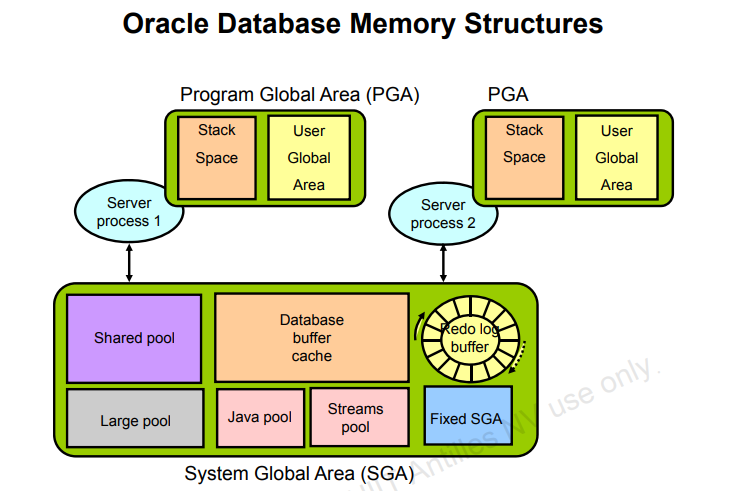
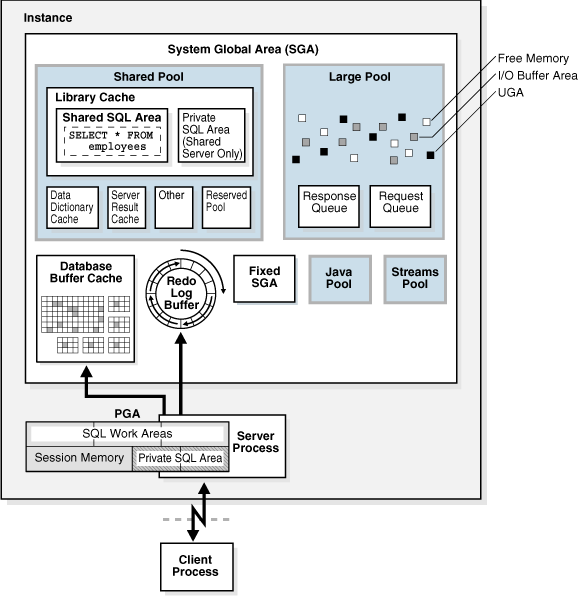
The PGA is private memory allocated for each server process.
Each user session gets its own PGA.
What Does PGA Store?
- Sort areas (ORDER BY, GROUP BY)
- Hash join data
- Session variables
- Cursor state
💡 Poor PGA sizing leads to disk-based sorts, which hurts performance.
PGA vs SGA (Quick Comparison)
| Feature | SGA | PGA |
|---|---|---|
| Shared | Yes | No |
| Scope | Instance-wide | Per session |
| Stores SQL cache | Yes | No |
| Stores sort data | No | Yes |
Oracle Background Processes

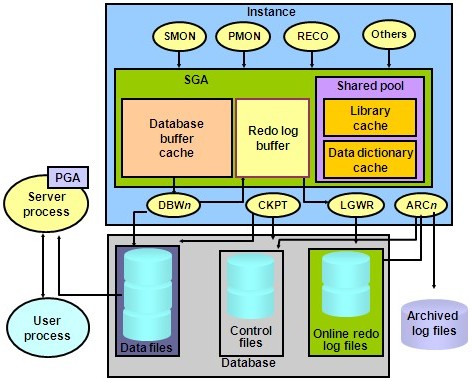
Background processes are the workers that keep the database running smoothly.
DBWR (Database Writer)
Role:
- Writes modified (dirty) blocks from buffer cache to datafiles
Triggered by:
- Checkpoints
- Buffer cache pressure
- Timeout events
LGWR (Log Writer)
Role:
- Writes redo entries from redo buffer to redo log files
Why it’s critical:
- Guarantees data durability
- Enables crash recovery
💡 COMMIT does not write data to disk—it writes redo!
CKPT (Checkpoint)
Role:
- Signals checkpoints
- Updates control files and datafile headers
Checkpoints help Oracle reduce recovery time.
SMON (System Monitor)
Responsibilities:
- Instance recovery after crash
- Cleans temporary segments
- Coalesces free space
PMON (Process Monitor)
Responsibilities:
- Cleans up failed user sessions
- Releases locks
- Frees PGA memory
How a SQL Query Uses All These Components
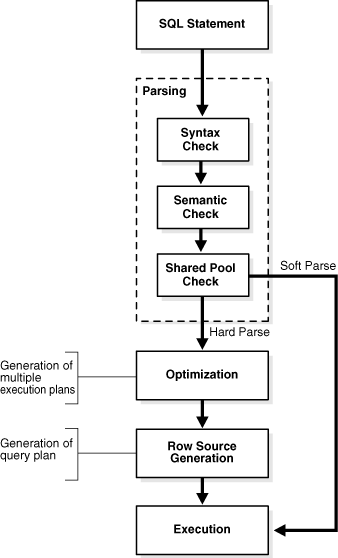
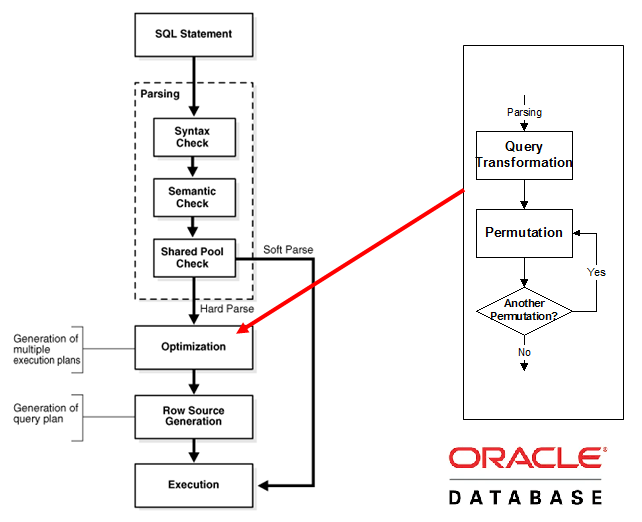
Let’s simplify the flow:
- User sends SQL query
- SQL checked in Shared Pool
- If not found → parsed
- Data searched in Buffer Cache
- If missing → read from disk
- Changes recorded in Redo Buffer
- LGWR writes redo to disk
- DBWR writes data later
This coordination is what makes Oracle fast and reliable.
Why This Knowledge Matters
Understanding SGA, PGA, and background processes helps you:
- Tune performance
- Troubleshoot memory issues
- Read AWR reports
- Answer interview questions confidently
- Design stable production systems
Who Should Master This Topic?
This knowledge is mandatory for:
- Oracle DBAs
- Performance engineers
- Backend developers
- Cloud DB admins
- Oracle interview candidates
What’s Next?
👉 Blog #3: Oracle Tablespaces, Datafiles, Segments & Extents (With Real Examples)
In the next blog, we’ll explain how Oracle stores data physically and logically, and why tablespace design matters in production systems.